
ساخت سیستم لایک مطالب با PHP و Ajax

لایک مطالب با PHP و Ajax – یکی از نمونه های که لایک پست را دارد فیسبوک ، اینستاگرام و شبکه های اجتماعی دیگر است . همچنین خیلی از وبلاگ ها از این ویژگی بهره می برند .
ما در این آموزش از تکنولوژی Ajax استفاده می کنیم که باعث می شود بدون نیاز به بارگذاری مجدد صفحه پست مورد نظر را Like کرده و به تعداد آن اضافه کنیم یا بلعکس .
صفحه index.php برای نمایش مطالب و لایک آن
<!DOCTYPE html>
<html lang="fa">

<head>
    <meta charset="UTF-8">
    <meta name="viewport" content="width=device-width, initial-scale=1.0">
    <title>RapidCode.IR - ساخت جستجوی پیشرفته AJAX با PHP و Javascript</title>
    <style>
    body {
        text-align: center;
        overflow-x: hidden;
    }

    #introduce {
        color: white;
        text-decoration: none;
        font-weight: bold;
        display: block;
        width: 100%;
        padding: 5px 10px;
        background-color: #4CAF50;
        text-align: center;
        font-size: 25px;
        margin-bottom: 45px;
    }

    .container{
        width: 70%;
        margin: 15px auto;
        direction: rtl;
    }

    article {
    width: 25%;
    border: 2px solid skyblue;
    padding: 10px;
    float: right;
    margin-left: 15px;
    }

    article img {
    width: 200px;
    }

    article h2{
        height: 82px;
    }

    article p{
        height: 56px;
        overflow: hidden;
    }

    article a {
    text-decoration: none;
    font-weight: bold;
    background-color: #FF9800;
    color: white;
    width: 100%;
    padding: 10px 0;
    display: block;
    }

    .like-wrapper .like-shape{
        background-size: 25px;
        background-repeat: no-repeat;
        width: 25px;
        height: 25px;
        display: inline-block;
        vertical-align: middle;
        cursor: pointer;
        background-image: url("img/heart-empty.png");
		transition: all 0.3s;
    }

	.like-wrapper .like-shape:active{
		transform: scale(2.5);
	}

    .like-wrapper .like-shape.full{
        background-image: url("img/heart-full.png");
    }


    </style>
</head>

<body>
    <a id="introduce" target="_blank" href="https://rapidcode.ir">رپید کد - کتابخانه مجازی برنامه نویسان</a>

    <div class="container">

<?php

require_once "posts.php";

$posts = get_posts();

?>


<?php

foreach ($posts as $row):

?>
    <article>
        <img src="<?php echo $row['thumbnail'] ?>" alt="<?php echo $row['title'] ?>">

        <h2><?php echo $row['title'] ?></h2>

        <p><?php echo $row['content'] ?></p>

		<?php

		$full_heart_html = "";

		if(@$_COOKIE['posts_like_list']){
			if(!is_array($_COOKIE['posts_like_list'])) $_COOKIE['posts_like_list'] = json_decode($_COOKIE['posts_like_list'] , true);


			if(in_array($row['id'] , $_COOKIE['posts_like_list'])){
				$full_heart_html = "full";
			}
		}


		?>


        <div class="like-wrapper">
            <span id="like-number"><?php echo $row['post_like'] ?></span>
            <span class="like-shape <?php echo $full_heart_html ?>" id="post_like_<?php echo $row['id'] ?>" data-post-id="<?php echo $row['id'] ?>"></span>
        </div><br>


        <a href="<?php echo $row['link'] ?>" target="_blank">ادامه مطلب</a>

    </article>

<?php endforeach;?>
    </div>

    <script src="app.js"></script>
</body>
</html>
فایل app.js
استفاده از جاوا اسکریپت برای لایک مطالب با Ajax ، همچنین تعریف می کنیم زمانی که روی دکمه like کلیک شد درخواست ارسال شود و همچنین شکل آن تغییر کند .
document.addEventListener("DOMContentLoaded", function() {

    const likeBtnDOM = document.getElementsByClassName("like-shape");
    let requestLock = false;

    for (const like of likeBtnDOM) {
        // like.dataset.postID
        like.addEventListener("click", checkLikePost);
    }


    // functions

    function checkLikePost() {
        const thisElement = this;
        const postID = thisElement.dataset.postId ? thisElement.dataset.postId : 0;
        likeRequest(postID)
    }

    // ajax Request

    function likeRequest(postID) {

    	if(requestLock)
    		return;

        const xhr = new XMLHttpRequest();
        xhr.responseType = "json";

        requestLock = true;

        let queryString = new URLSearchParams;

        const params = new FormData;
        params.append("post_id", postID);

        xhr.open("POST", location.href + "/like-api.php");

        xhr.onload = function() {
        	requestLock = false;
        	const response = this.response;

        	if(response.status == 1){
        		const postLike = document.getElementById("post_like_" + response.post_id);
        		postLike.classList.toggle("full");
        		postLike.previousElementSibling.textContent = response.post_like;
        	}else
        		alert("خطایی رخ داده");

        }

        xhr.onerror = function() {
            requestLock = false;
            console.warn("[XHR Error]");
        }

        xhr.send(params);

    }


});
فایل posts.php
توابعی که با دیتابیس در تعامل است در این فایل posts.php گنجانده شده است برای بروزرسانی تعداد لایک مطالب .
<?php

$table = "articles";
$mysqli = new mysqli("localhost", "root", "", "posts");
$mysqli->set_charset("utf8");
$stmt = $mysqli->stmt_init();

function get_posts($id = false) {
	global $table;
	global $mysqli;
	global $stmt;

	$where_statment = "";
	$rows = [];

	if (!empty($id)) {
		if (is_row_exits($id)) {
			$where_statment = "WHERE id=?";
		}else
		 return $rows;
	}

	$query = "SELECT * FROM `{$table}` {$where_statment} ORDER BY id DESC";

	$stmt->prepare($query);

	if (!empty($where_statment)) {
		$stmt->bind_param("i", $id);
	}

	if ($stmt->execute() && $res = $stmt->get_result()) {
		if ($stmt->affected_rows || $res->num_rows) {
			while ($row_loop = $res->fetch_assoc()) {
				$rows[] = $row_loop;
			}
		}
	}

	return $rows;
}

function is_row_exits($id) {

	global $table;
	global $mysqli;
	global $stmt;

	$query = "SELECT id FROM {$table} WHERE id=?";

	$stmt->prepare($query);

	$stmt->bind_param('i', $id);

	$is_found = 0;

	if ($stmt->execute() && $stmt->store_result()) {
		$is_found = $stmt->affected_rows;
		$stmt->free_result();
	}

	return $is_found;
}

function like_post($post_id, $state) {

	global $table;
	global $mysqli;
	global $stmt;

	$row_updated = false;

	$operation = "";

	if ($state == "+" OR $state == "-") {
		$operation = $state;
	}

	$query = "UPDATE {$table} SET post_like = post_like {$operation} 1 WHERE id=?";

	$stmt->prepare($query);

	$stmt->bind_param('i', $post_id);

	if ($stmt->execute()) {
		$row_updated = $stmt->affected_rows ? $stmt->affected_rows : 1;
	}

	return $row_updated;
}

?>
فایل like-api.php
این بخش که خروجی json به ما برمی گرداند و داده های پست و تعداد لایک را به ما می دهد .
<?php

header("Content-Type: application/json");
require_once "posts.php";

if (empty($_POST['post_id'])) {
	die(json_encode(["msg" => "post id does not set", "status" => 0]));
}

if (!is_row_exits($_POST['post_id'])) {
	die(json_encode(["msg" => "post not found", "status" => 0]));
}

$posts_like = [];
$operation = "+";

if (!empty($_COOKIE['posts_like_list'])) {

	$posts_like = json_decode($_COOKIE['posts_like_list'], true);

	foreach ($posts_like as $post_like) {
		if ($_POST['post_id'] == $post_like) {
			$operation = "-";
			break;
		}
	}

} else {
	$posts_like[] = $_POST['post_id'];
}

$res = like_post($_POST['post_id'], $operation);

if ($res) {

	if ($operation == "-") {
		$array_key_like = array_search($_POST['post_id'], $posts_like);
		if ($array_key_like !== false) {
			unset($posts_like[$array_key_like]);
		}

	} else if ($operation == "+" && !empty($_COOKIE['posts_like_list'])) {
		$posts_like[] = $_POST['post_id'];
	}

	setcookie("posts_like_list", json_encode($posts_like), time() + 86400);

	$current_post_data = get_posts($_POST['post_id'])[0];

	echo json_encode(["msg" => "success" , "status" => 1 , "post_like" => $current_post_data['post_like'] , "post_id" => $current_post_data['id']]);
}else
	echo json_encode(["msg" => "something went wrong DB", "status" => 0]);

?>
خروجی نهایی برنامه
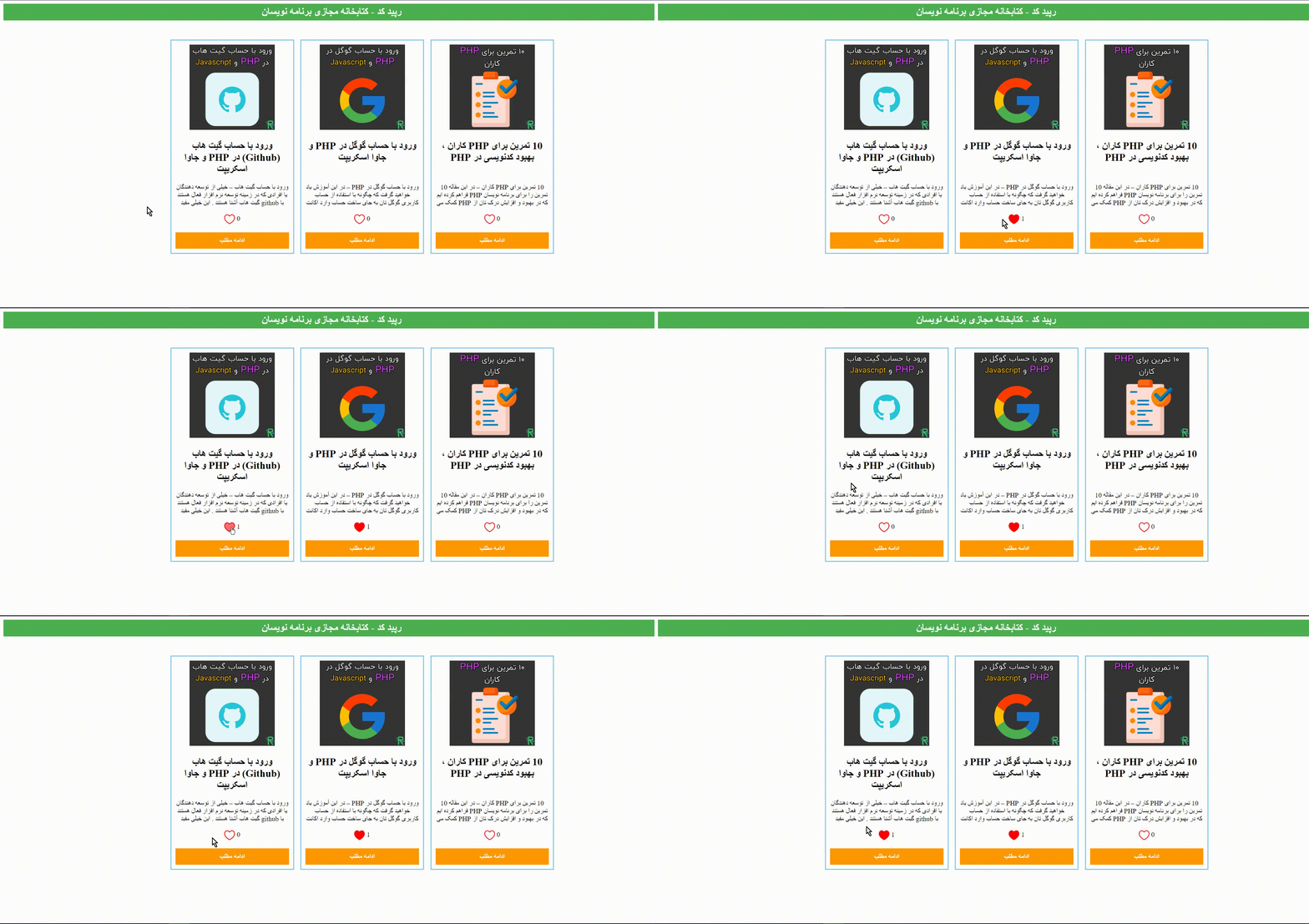
قبل از اجرای برنامه وارد پوشه posts DATABASE to import شده دیتابیس را import کنید

لیست نظرات
سلام باید index.php را برای لایک ، زیر مطلب خودم قرار دهم ؟؟ وباید برای هر لایک یک دیتابس تشکیل بدم؟؟
درود ، سورس را دانلود کرده و در مسیر wamp64/www در پوشه ای با نام post_like کپی کنید حال وارد آدرس localhost/phpmyadmin در مرورگر خود بشید نام کاربری root و پسورد خالی می باشد وارد شده روی new database کلیک کنید و با نام posts بسازید وارد تب import شده و فایلی که کپی کرده بودید و در پوشه post database to import می باشد را انتخاب کنید پس از انجام این اقدام باید پیغام موفقیت آمیز برای import کردن دیتابیس دریافت کنید حال وارد آدرس localhost/post_like شده و از برنامه می توانید استفاده کنید .
سلام و تشکر از مطالب عالیتون، من این پست رو اجرا کردم همه چیز در نمای بروزر خوب اجرا شده ولی وقتی تست میکنم و لایک رو میزنم علامت قلب کوچیک و بزرگ میشه ولی لایک نمیخوره و مقدار همون صفر باقی مونده
درود ، مطمئن بشید که دیتابیس وصل هست . در صورتی که باز هم مشکل داشتید از خطا در console اسکرین شات بفرستید .
سلا مببخشید چرا برای من چنین اروری میدهWarning: mysqli_stmt::execute(): invalid object or resource mysqli_stmt in C:\xampp\htdocs\barmaanshokoohi\post like\posts.php on line 31
درود ، یک پارامتر نامعتبر برای اجرای کوئری وارد کردید .