
ساخت popup و نوتیفیکیشن های (موفق,خطا,هشدار) در جاوا اسکریپت
ساخت popup و نوتیفیکیشن جاوا اسکریپت – با کمک کتابخانه cute alert می توانیم علاوه بر پاپ آپ ، نوتیفیکیشن هم اضافه کنیم ، امکان شخصی سازی هر دو وجود دارد .
به طور کلی 5 حالت اصلی یعنی success , error , warning , info , question را دارد .
صفحه اصلی HTML پاپ آپ و نوتیفیکیشن
<!DOCTYPE html>
<html lang="fa">
<head>
    <meta charset="UTF-8">
    <title>Rapidcode.iR - سورس کد</title>
    <link rel="stylesheet" href="static/css/lib/style.css">
    <link rel="stylesheet" href="static/css/main.css">
    <script src="static/js/lib/cute-alert.js"></script>
</head>
<body>


    <div class="container">
        <a id="introduce" href="https://rapidcode.ir" target="_blank">رپید کد • کتابخانه مجازی برنامه نویسان</a>

        <h2>دیالوگ باکس</h2>

        <button id="success">موفق</button>
        <button id="error">خطا</button>
        <button id="warning">هشدار</button>
        <button id="info">اطلاعات</button>
        <button id="question">سوالی</button>

        <hr>

        <h2>نوتیفیکیشن</h2>

        <button id="ts-success">موفق</button>
        <button id="ts-error">خطا</button>
        <button id="ts-warning">هشدار</button>
        <button id="ts-info">اطلاعات</button>


    </div>


    <script src="static/js/app.js"></script>
</body>
</html>
فایل app.js برای تنظیم کتابخانه
// دیالوگ باکس ها

const success = document.getElementById("success");
const error = document.getElementById("error");
const warning = document.getElementById("warning");
const info = document.getElementById("info");
const question = document.getElementById("question");

success.addEventListener("click", () => {
    cuteAlert({
        type: "success",
        title: "موفقیت آمیز",
        message: "این یک پیغام موفقیت آمیز است",
        buttonText: "باشه",
        closeStyle: "circle"
    })
});

error.addEventListener("click", () => {
    cuteAlert({
        type: "error",
        title: "خطا",
        message: "این یک پیغام خطا است",
        buttonText: "باشه",
        closeStyle: "circle"
    })
});

warning.addEventListener("click", () => {
    cuteAlert({
        type: "warning",
        title: "هشدار",
        message: "این یک پیغام هشدار است",
        buttonText: "باشه",
        closeStyle: "circle"
    })
});

info.addEventListener("click", () => {
    cuteAlert({
        type: "info",
        title: "اطلاعات",
        message: "این یک پیغام اطلاعات است",
        buttonText: "باشه",
        closeStyle: "circle"
    })
});

question.addEventListener("click", () => {
    cuteAlert({
        type: "question",
        title: "سوالی",
        message: "این یک پیغام سوالی است",
        confirmText: "حله",
        cancelText: "لغو",
        closeStyle: "circle"
    }).then((e) => {
        if (e == "confirm") alert("تایید شد");
        else alert("لغو شد")
    });
});


// نوتیفیکیشن ها

const ts_success = document.getElementById("ts-success");
const ts_error = document.getElementById("ts-error");
const ts_warning = document.getElementById("ts-warning");
const ts_info = document.getElementById("ts-info");

ts_success.addEventListener("click", () => {
    cuteToast({
        type: "success",
        message: "این یک نوتیفیکیشن موفقیت آمیز است",
        timer: "4500"
    })
});

ts_error.addEventListener("click", () => {
    cuteToast({
        type: "error",
        message: "این یک نوتیفیکیشن خطا است",
        timer: "4500"
    })
});

ts_warning.addEventListener("click", () => {
    cuteToast({
        type: "warning",
        message: "این یک نوتیفیکیشن هشدار است",
        timer: "4500"
    })
});

ts_info.addEventListener("click", () => {
    cuteToast({
        type: "info",
        message: "این یک نوتیفیکیشن اطلاعات است",
        timer: "4500"
    })
});
type: نوع پاپ آپ یا نوتیفیکیشن
title: عنوان
message: پیغام
buttonText: نوشته دکمه
closeStyle: شکل دکمه خروج
timer : زمان نمایش نوتیفیکیشن به میلی ثانیه
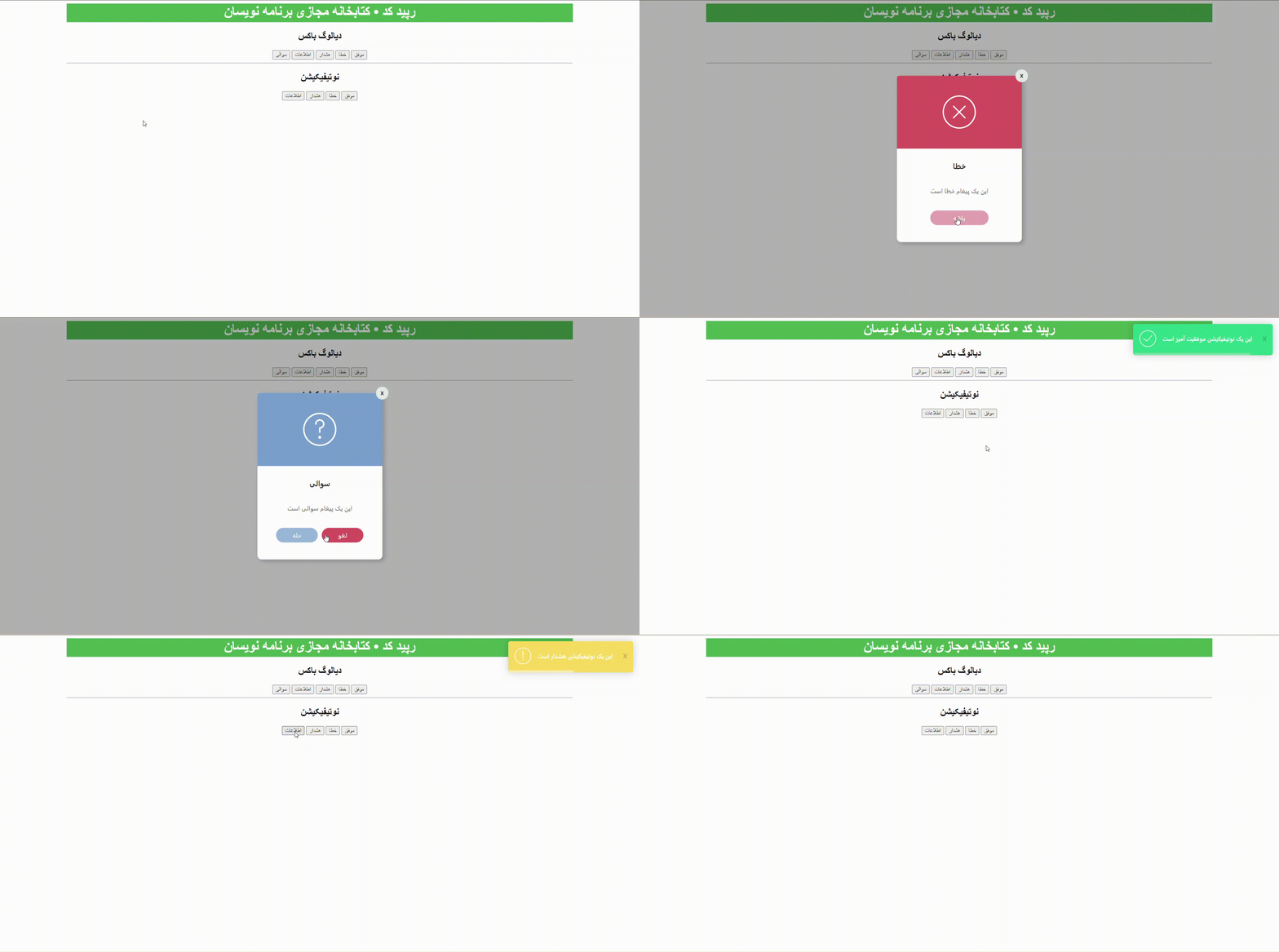
خروجی برنامه

لیست نظرات
سلام وقت بخیر من کد رو مثل شما نوشتم ولی به دو تا مشکل خوردم: 1- اروری که به من میگه تو فایل cute-alert.js و در خط 215 : url is not defind میگه یو آر ال تعریف نشده 2- اروری که میگه: success.addEventListener is not a function لطف کنید راهنمایی کنید
درود ، سورس پروژه در پایین مطلب قرار داده شده می تونید پروژه رو مطابق با نیازی که دارید ویرایش کنید .
سلام به سوال من میخوام اون حالت نوتیفیکیشن وقتی که کاربری به سایت وارد میشه توی صفحه اصلی نشون داده بشه چه کدی باید قرار بدم ؟ ممنون میشم پاسخ بدید
درود ، بله این مورد آموزشی رو هم قرار هست که طی چند روز آینده داخل سایت بذاریم . بروزرسانی : آموزش ساخت نوتیفیکیشن با php و Ajax