
آموزش ساخت موزیک پلیر حرفه ای در جاوا اسکریپت
ساخت موزیک پلیر حرفه ای با MediaElement.js – در این آموزش با کمک کتابخانه مدیا المنت یک audio player یا موزیک پلیر شیک و زیبا خواهیم ساخت .
از جمله ویژگی های آن می توان به :
پوستر آهنگ
نام آهنگ
نام خواننده
نام آلبوم اشاره کرد .
فایل index.html ساختار موزیک پلیر
<!DOCTYPE html>
<html lang="fa">
<head>
    <meta charset="UTF-8">
    <title>Rapidcode.iR - CODE</title>
    <link rel="stylesheet" href="static/css/lib/mediaelementplayer.min.css">
    <link rel="stylesheet" href="static/css/main.css">
</head>
<body>


    <div class="container">
        <a id="introduce" href="https://rapidcode.ir" target="_blank">رپید کد • کتابخانه مجازی برنامه نویسان</a>


        <audio id="player" data-song-name="House of the Rising Sun" data-singer="The Animals" data-album="XT" data-poster="https://ts2.tarafdari.com/contents/user6984/content-sound/3207122-56a6ca785f9b58b7d0e4a910.jpg" src="https://ts2.tarafdari.com/contents/user6984/content-sound/the_animals_-_the_house_of_the_rising_sun.mp3"></audio>


    </div>


    <script src="static/js/lib/mediaelement-and-player.min.js"></script>
    <script src="static/js/lib/mediaelement-fa.js"></script>
    <script src="static/js/app.js"></script>
</body>
</html>
فایل main.css استایل موزیک پلیر
.container{
    margin: 0 auto;
    width: 80%;
    text-align: center;
    direction: rtl;
}

#introduce{
    display: block;
    width: 100%;
    font-size: 35px;
    font-weight: bold;
    color: white;
    padding-bottom: 5px;
    background-color: #4CAF50;
    text-decoration: none;
    margin-bottom: 15px;
}


/* Page Style */

.mejs__mediaelement{
    background: linear-gradient(45deg, #2196F3, #CDDC39);
}

.mejs__container{
    margin-top: 45px;
    display: inline-block;
}

.wrapper-mejs-audio-details{
    width: 90%;
    margin: 0 auto;
    direction: ltr;
}

#mejs-poster-audio{
    width: 150px;
    height: 150px;
    border-radius: 50%;
    box-shadow: 0 0 8px #3a3a3a;
    margin-top: 13px;
    display: inline-block;
    object-fit: cover;
}

.audio-playing{
    animation: scaledownup 3s infinite
}

.song-details , .song-details table{
    display: inline-block;
}

.song-details{
    margin-right: 70px;
    margin-top: 60px;
    float: right;
}

.song-details table{
    direction: rtl;
}


@keyframes scaledownup {
    0%{
        transform: scale(0.95);
        box-shadow: 0 0 8px #f44336;
    }

    50%{
        transform: scale(1);
        box-shadow: 0 0 25px #bcbe34;
    }

    100%{
        transform: scale(0.95);
        box-shadow: 0 0 8px #3a3a3a;
    }
  }
فایل app.js تنظیم رفتار موزیک پلیر
mejs.i18n.language("fa")

var player = new MediaElementPlayer('player', {

    audioWidth : 700,
    audioHeight : 200,

    success: function(mediaElement, originalNode, instance) {
        console.info("شروع پخش");
        const mediaElementDOM = document.getElementsByClassName("mejs__mediaelement")[0];

        const poster = originalNode.getAttribute("data-poster");
        const singer =  originalNode.getAttribute("data-singer");
        const songName =  originalNode.getAttribute("data-song-name");
        const album =  originalNode.getAttribute("data-album");

        let mediaElementHtml = mediaElementDOM.innerHTML;

        const songDetails = `<div class="song-details"><table><tbody><tr id="singer"><td>خواننده :</td><td>${singer}</td></tr><tr id="song-name"><td>نام آهنگ :</td><td>${songName}</td></tr><tr id="album-name"><td>نام آلبوم :</td><td>${album}</td></tr></tbody></table></div>`;

        mediaElementHtml = `<div class="wrapper-mejs-audio-details"><img id="mejs-poster-audio" src="${poster}">${songDetails}</div>` + mediaElementHtml;

        mediaElementDOM.innerHTML = mediaElementHtml;
        const thumbnailSongDOM = document.getElementById("mejs-poster-audio");


        mediaElement.addEventListener("playing" , function(){
            thumbnailSongDOM.classList.add("audio-playing");
        });

        mediaElement.addEventListener("pause" , function(){
            thumbnailSongDOM.classList.remove("audio-playing");
        });

    },

});
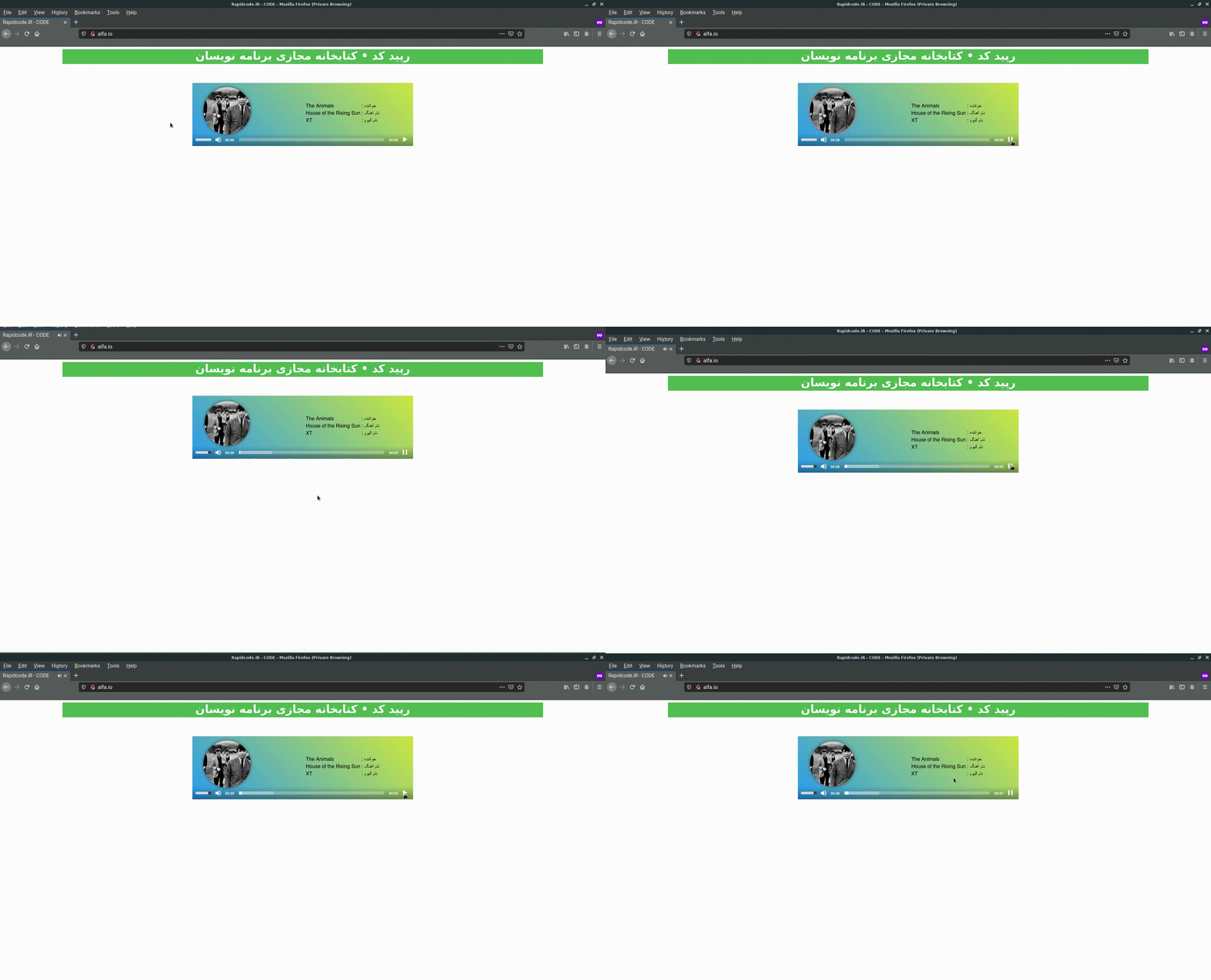
تست music player
همچنین اگر میخواهید video پلیر را سفارشی سازی کنید و بسازید با آموزش ویدیو پلیر حرفه ای با جاوا اسکریپت همراه باشید .

لیست نظرات
دست شما درد نکنه خیلی کاربردی بود خیلی نکاتی که گفتید واقعا من نمیدونستم